News
Introducing Yada Wifi: Guest Wi-Fi That Knows Who’s Staying
Yada Wifi is free guest Wi-Fi for vacation rentals. Every stay gets its own Wi-Fi code, Airbnb guests have nothing to fill in, and everyone else is invited to your rewards program. Here’s how it works and what you need.

Petar Ojdrovic
Yada
·
5 min read

Today we’re launching Yada Wifi, free guest Wi-Fi for vacation rentals. A guest joins your network, your branded sign-in page opens, and Yada already knows which stay is on that unit and where it was booked. Airbnb guests type the Wi-Fi code from their check-in message and they’re online. Direct, Vrbo and Booking.com guests can use the last name on their booking instead, and get an invite to your rewards program once they’re connected.
Get started with Yada Wifi, free →
Why we built it
Most rentals still run guest Wi-Fi the same way: one password, printed in the guidebook and shared with every guest who has ever stayed. It never changes, it lives on in old message threads and screenshots, and it tells you nothing about who is on your network.
Wi-Fi sign-in pages fixed some of that, and plenty of operators used them to say hello and build a guest list. Then Airbnb changed the rules. For reservations booked from November 20, hosts can’t ask Airbnb guests for an email, a phone number or a signature at any point in the booking or the stay, and Wi-Fi sign-in pages are named in the policy. We covered the change in Airbnb Just Made Your Guests Strangers.
That leaves two kinds of guests on the same network: Airbnb guests you can’t ask for anything, and direct, Vrbo and Booking.com guests who are still yours to welcome back. Yada Wifi treats each one the right way, automatically, so you never have to think about which is which.
How a guest gets online
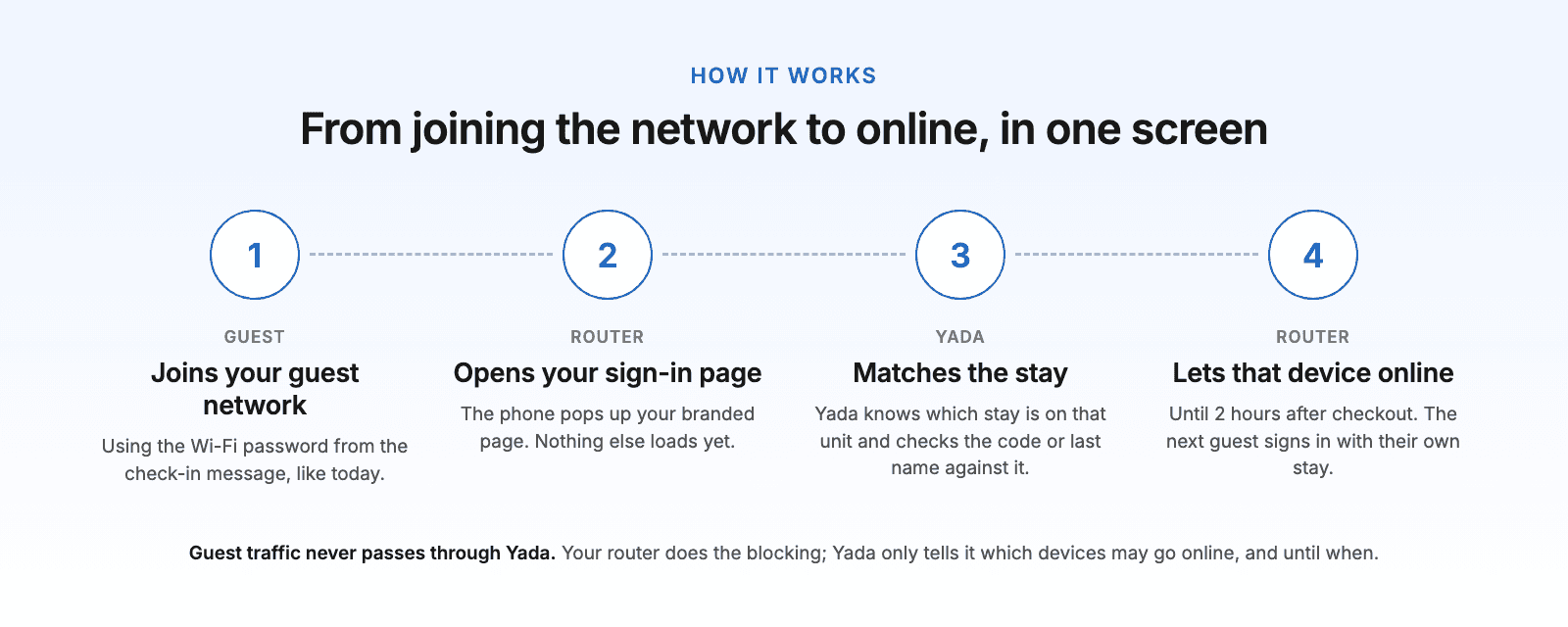
The guest joins your guest network with the Wi-Fi password from their check-in message, the same as today.
Their phone or laptop opens your sign-in page, with your logo and brand color.
They enter their Wi-Fi code, or the last name on the booking if they didn’t book on Airbnb.
Yada checks it against the stays on that unit and tells your router to let that device online until 2 hours after checkout.
Every phone, tablet and laptop signs in on its own, so a family of four uses the same code four times. When the stay ends, access ends with it, and the next guest signs in with their own stay.
One network, treated by channel
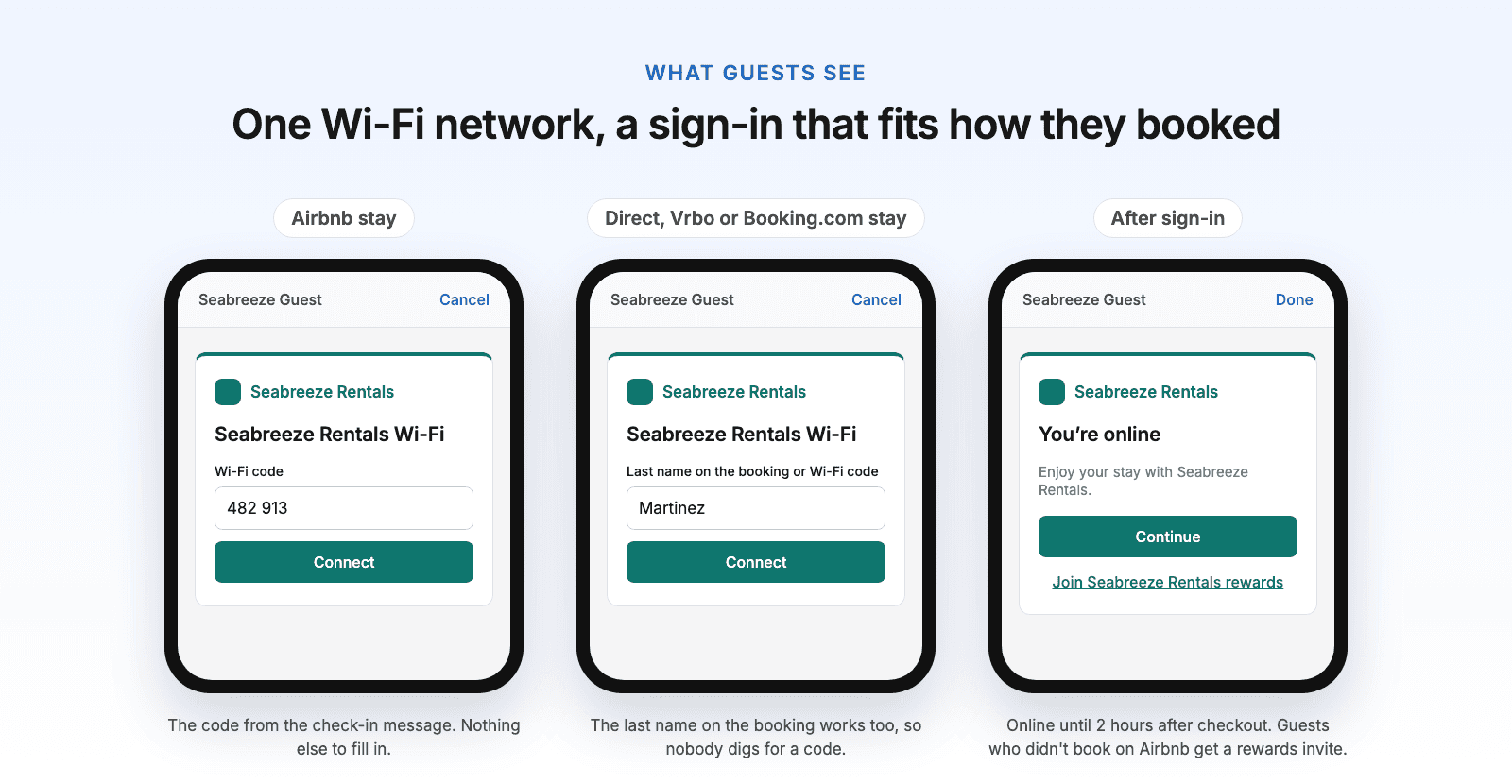
Airbnb stays | Direct, Vrbo and Booking.com stays | |
|---|---|---|
Signs in with | The Wi-Fi code | The Wi-Fi code or the last name on the booking |
Asked for anything else | No | No |
After sign-in | You’re online | You’re online, plus an invite to your rewards program |
When a unit has an Airbnb stay, its sign-in page asks for the code only. Airbnb doesn’t allow Wi-Fi sign-ins that ask for personal information, so Airbnb guests never see a name field and never see an invite.
Nothing has to be collected to know who is staying. Yada already has every reservation from your PMS, including where it was booked, so the sign-in only has to match a stay that’s already there.
The Wi-Fi code
Each stay gets its own 6-digit Wi-Fi code. Add {{wifiCode}} to your check-in message, next to the Wi-Fi password, and Yada fills in the right code for every stay.
Think of it like a door code. You issue it, the guest uses it, and nothing is collected from them. A code only works on the unit it was issued for and only during that stay, and repeated wrong guesses are slowed down.
Safer than a shared password
Only current guests get online. Last month’s guest, the neighbors and anyone with an old screenshot of the password stay off.
Access ends 2 hours after checkout, on every device.
Guest traffic never passes through Yada. Your router does the blocking; Yada only tells it which devices may go online, and until when.
With the recommended setup, the guest network sits on its own, so locks, cameras, thermostats and owner devices stay on your private network, out of guests’ reach.
In buildings with several units, client isolation keeps one unit’s guests from seeing another unit’s devices.
What you need
Yada Wifi runs on the router in your unit. There’s no proprietary hardware and no per-access-point fee.
UniFi: supported today. UniFi consoles and gateways running the Network app, such as the UniFi Express 7, Cloud Gateway Ultra and Dream Machine, with UniFi access points, managed from unifi.ui.com.
eero, Google Nest Wifi, Netgear Orbi, TP-Link Deco and internet-provider routers: these can’t show a sign-in page. Add one UniFi access point to the unit and use it for the guest network. Your current Wi-Fi becomes the private network.
Omada and Meraki: coming next.
Setting it up
In Yada, open Settings → Integrations → Guest Wi-Fi and paste a UniFi Site Manager API key.
Assign each UniFi site to its listing. In a building with several units, assign each access point to its own unit.
On your UniFi network, turn on Hotspot for the guest network and point it at Yada’s sign-in page. The setup guide lists the exact settings.
Add
{{wifiCode}}to your check-in message.Use Test on the Guest Wi-Fi page to see which stay a sign-in would match, before a guest ever tries it.
We’re bringing Yada Wifi up with our first properties now. Not on UniFi, or not sure what’s in your units? Tell us your setup and we’ll help you through your first unit.
What it costs
Nothing. Yada Wifi is free.
Where it fits in Yada
Wi-Fi is one moment in a stay. Yada handles the rest: a guest database built from your PMS, email and SMS journeys that bring past guests back between stays, and a loyalty program that gives them a reason to book direct next time. The rewards invite after sign-in is where those meet: the guests who chose you get a reason to keep choosing you.
Questions
Do I need new hardware?
Not if your units run UniFi. If they run consumer mesh or an internet-provider router, add one UniFi access point for the guest network.
What do Airbnb guests have to fill in?
Only the Wi-Fi code from their check-in message. No email, no phone number, no name.
How many devices can a guest connect?
As many as they bring. Each device signs in on its own with the same code and stays online for the whole stay.
What if a guest can’t find their code?
Guests who didn’t book on Airbnb can use the last name on the booking. For everyone else, the code is in their check-in message, and you can send it again.
Does it slow down the internet?
No. Guest traffic goes straight through your router. Yada only handles the sign-in.