![yada_logo_wide.png]](https://yada.ai/hs-fs/hubfs/yada_logo_wide.png?width=150&height=75&name=yada_logo_wide.png)
What Signals does
Signals reviews your guest and stay data and suggests personalized outreach for guests who may be ready to book again, return during a seasonal window, or respond to a targeted follow-up.
How to use Signals in bulk
-
From the left-hand menu, click Marketing, then select Signals.
-
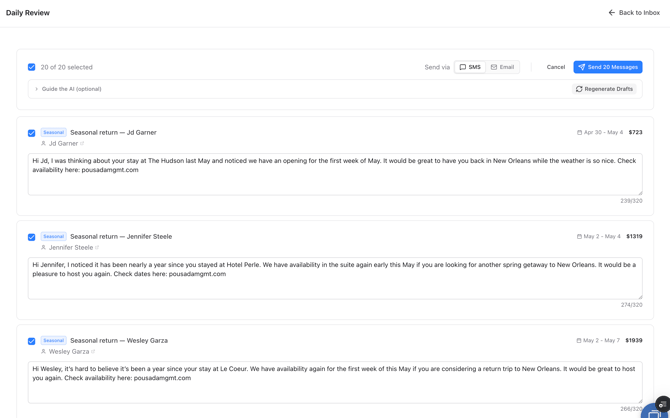
To draft and send in bulk, click Daily Review in the top right corner of the page.
-
Choose the channel you want to send via (SMS or Email)
-
Edit any messages that need a tweak, or deselect them if you don't want to reach out to that contact.
-
Click the blue Send [X] Messages button in the top right to send.
How to review and send a single Signal
-
Open Signals.
-
Review the suggested opportunity.
-
Click Accept to open the generated message.
-
Review the content and make any edits you want.
-
Choose the channel:
-
SMS for a text message
- Email for an HTML email version
-
-
Click Accept and Send.
Signals vs. Campaigns vs. Journeys
-
Signals: targeted, timely outreach based on guest behavior and booking patterns
-
Campaigns: one-to-many sends, such as monthly SMS or email blasts
-
Journeys: automated messages triggered by an event or timing rule, such as post-checkout or pre-stay upsells
Tips for best results
-
Start by reviewing a few Signals manually
-
Edit as needed so messages sound like your brand
-
Use email when a guest does not have a textable number or when a richer message is helpful
-
Use Daily Review when you want a fast workflow for sending several high-fit messages
If a message cannot be sent
A message may fail if:
-
the contact does not have a valid phone number or email
-
the channel is not enabled
-
the sending provider has an issue
-
the number is international and not supported by your current sending setup
If this happens, check the guest contact record, confirm your sending channel is connected, and contact Yada support at team@yada.ai if the issue continues.
Coming soon:
If your guests use WhatsApp heavily, Signals will also become much more powerful for international outreach once WhatsApp sending is enabled on your account.